
OXT Mini Roller Shutter Controller | ZigBee 3.0 | TUYA Smart Module
- OXT Mini Roller Shutter Controller | ZigBee 3.0 | TUYA Smart Module


OXT | In-Wall Module | Roller Shutter Controller
ZigBee | TUYA
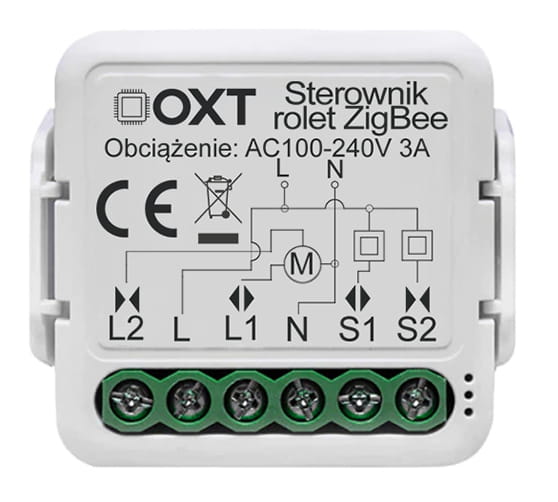
▶️ Control Roller Shutters, Blinds & Awnings
- ✅ Up & Down Control: Smart operation for roller shutters, blinds, and awnings.
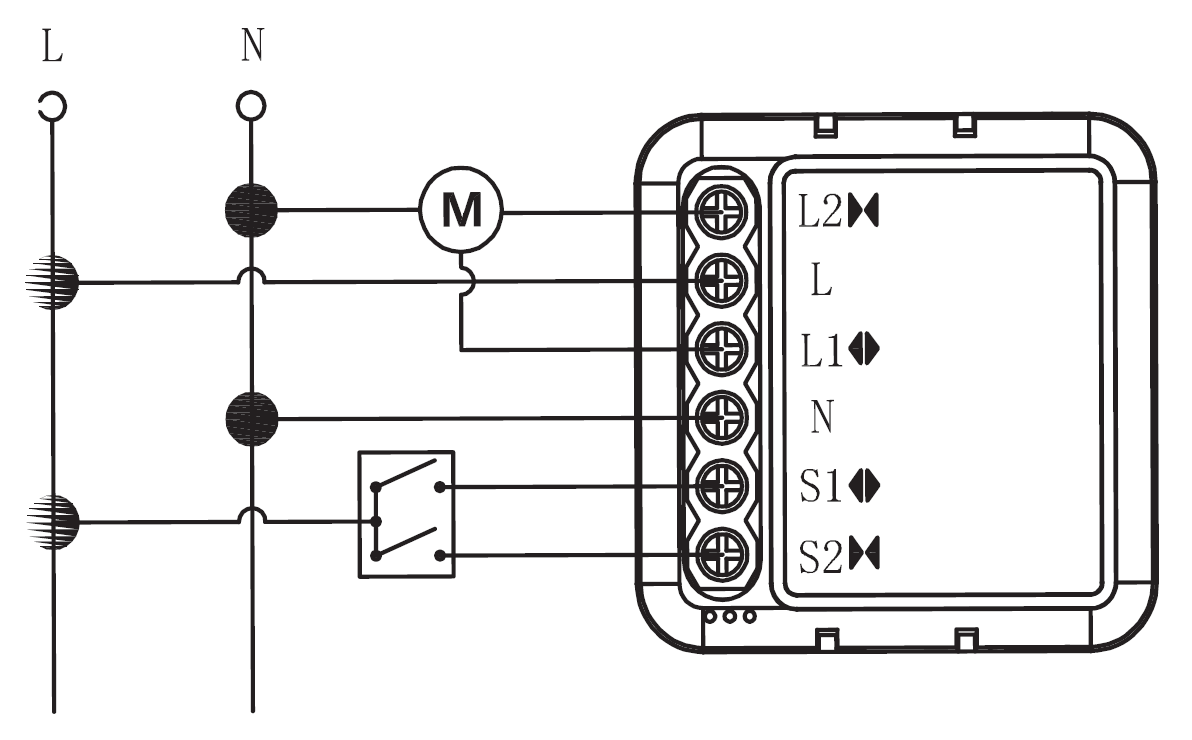
- ✅ In-wall Installation: Easily fits into a standard wall box behind a manual switch.
- ✅ Switch Compatibility: Works with both monostable and bistable switches – selectable in the app.
▶️ Flexible Configuration Options
- ✅ Calibration Modes: Full (per manual) or simplified (based on opening time).
- ✅ Schedules: Set automatic open and close times to match your daily routine.
- ✅ Timers: Delay functions for enhanced comfort and convenience.
▶️ Smart Home Integration
- ✅ Mobile App: Remote control via TUYA Smart App (Android / iOS).
- ✅ Automation Scenes: Based on weather, time, sunrise/sunset, and other TUYA events.
- ✅ Voice Control: Works with Amazon Alexa and Google Home.
▶️ Versatility & Compatibility
- ✅ Voltage Standards: Compatible with international electrical systems.
- ✅ Compact Design: Fits easily into most wall boxes.
⚠️ Note: A ZigBee 3.0 TUYA Gateway is required for operation (available separately).

ℹ️ ZigBee Protocol Basics:
The ZigBee protocol operates at the 2.4 GHz frequency band, which provides excellent indoor range and signal stability.
ZigBee uses MESH communication, meaning that every ZigBee device with full power (L+N) acts as a signal repeater for other devices. If a remote sensor cannot connect directly to the ZigBee hub, it only needs radio contact with another fully powered ZigBee device connected to the hub (up to 3 hops). This creates a reliable mesh network ensuring stable connectivity.
ZigBee devices connect to the hub in just 0.2 seconds, while WiFi devices may take up to 5 seconds. This gives ZigBee a significant advantage in automation speed and performance.
WiFi networks start experiencing stability issues with around 25 connected devices ❌, while a ZigBee hub can easily support 50+ devices ✔️.
ZigBee gateways and devices also provide extended history and data storage for device activity — such as door open/close logs, temperature records, or motion detection history — stored for months.
The ZigBee protocol consumes very little power, ensuring long battery life for battery-operated devices.
ℹ️ Specifications:
▶️ General Information
- Product Type: ZigBee Roller Shutter Controller
- Protocol: ZigBee 3.0
- Range: up to 100 m
- Certifications: CE, RoHS
▶️ Electrical Parameters
- Rated Voltage: AC 100–240 V 50/60 Hz
- Maximum Current: 3 A
- Communication Frequency: 2.412–2.484 GHz
▶️ Operating Environment
- Operating Temperature: -10℃ to +40℃
- Protection Rating: IP20
▶️ Dimensions & Design
- Dimensions: 39.2 × 39.2 × 18 mm
ℹ️ Calibration:
1. Open Settings and select the Calibration option.
2. Follow the on-screen instructions (do not close the window until the process completes).
3. Use the physical switch to open and close the roller shutter or curtain.
4. A completion message will appear when the calibration is finished.
ℹ️ Included in the set:
- OXT Mini Roller Shutter Controller ZigBee TUYA
- Mounting clip
- User manual
- Sales document
Product code: T267

